Moon Phase Calendar
- 4.4
- Rating
- 1.00M
- Installs
- Free
- Price
 Analysis by App-foxy
I like weather apps that do one job clearly, and Moon Phase Calendar takes a more focused route than a typical forecast tool. Instead of trying to replace a full weather service, it centers the experience on the moon: its changing phase, the lunar calendar, moonrise and moonset information, and a three-dimensional view of the moon. That makes it a useful companion for anyone who plans around lunar light or simply enjoys understanding what is happening in the night sky.
I spent time treating it as an everyday reference rather than a novelty. The app is free, developed by Coocent, and aimed at Everyone, so the barrier to trying it is low. Its current version is 1.4.2, and it works on Android 7.0 and later. Those details matter because this is not a specialist astronomy package requiring a recent device or a paid commitment before you can see whether the lunar tools fit your routine.
What Moon Phase Calendar actually does
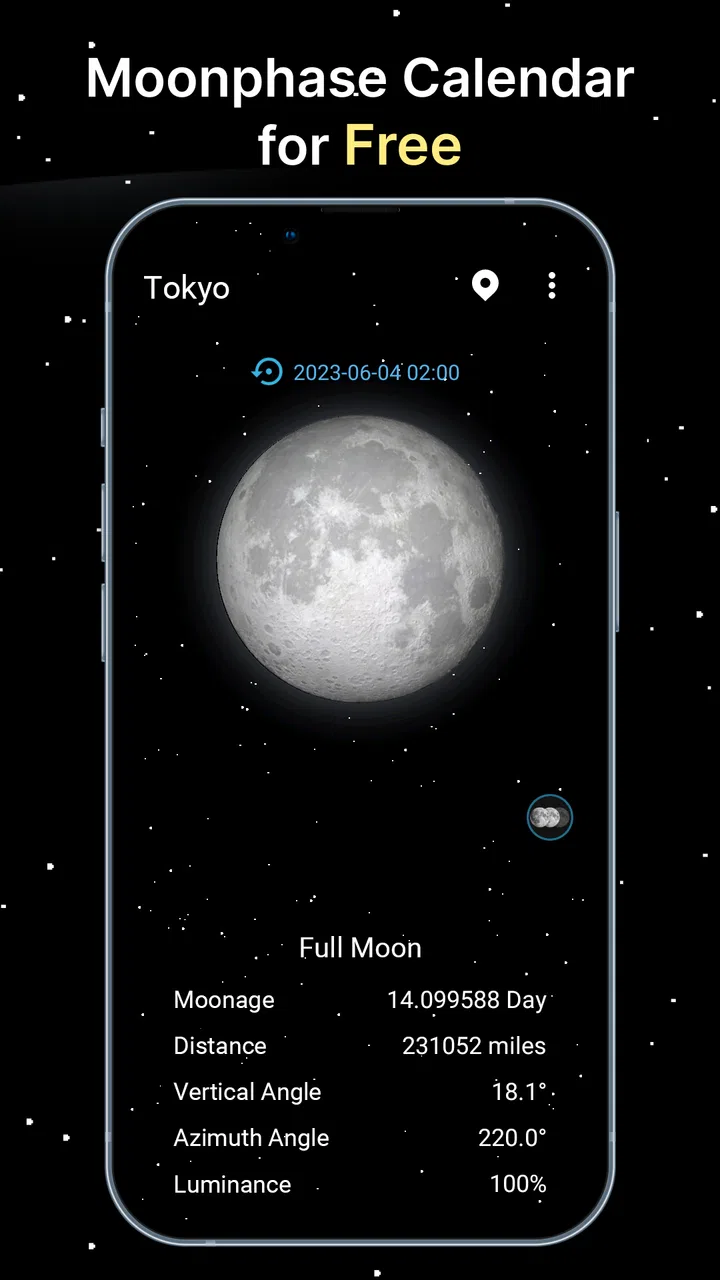
The name is straightforward, but the app offers more than a single moon icon changing from night to night. Its central idea is a calendar built around lunar phases. You can use that view to understand where the moon is in its cycle, then connect that information with moonrise and moonset times. The three-dimensional moon view adds a more visual way to inspect the lunar surface and its changing illumination.
You May Also Like

 Blood Strike: 2.5 Anniversary
Blood Strike’s Loadouts Turn Every Drop Into a Tactical Gamble
A close look at Blood Strike’s custom loadouts: how fast access to signature weapons reshapes its battle royale rhythm, rewards preparation, and narrows the gap between fights.

 Pandora - Music & Podcasts
Pandora’s Music Is Easy to Start, but Harder to Recover
Pandora’s strength is its low-effort path from a seed to a station. Its weak spot is how much confidence it asks you to place in connection, setup, and quiet recovery.

 8 Ball Pool
 Is Built on Rivalries, Rematches, and Routine
A close look at the rivalries, rematches, shared routines, and unanswered safety questions that turn a quick pool match into a persistent mobile community.

 Samsung Music
’s Quiet Strength Is Playing What You Already Own
Its reach comes less from spectacle than from dependable access to a personal library. That simplicity is both the app’s strongest retention engine and its ceiling.

 AccuWeather: Weather Radar
AccuWeather Review: A Quick, Clear Forecast for Everyday Decisions
For everyday plans, the best forecast is the one you can understand quickly. AccuWeather makes rain timing, radar, and local conditions easy to act on, with a few trade-offs.

 Hill Climb Racing
Why Hill Climb Racing Still Turns Crashes Into One More Run
A tiny car, a bumpy hill and one more upgrade: Hill Climb Racing keeps resurfacing because its simple chaos makes every near-miss feel personal.
More From Our News Desk



That combination gives the app a different purpose from the moon symbol included in many weather applications. A weather app may tell you whether the night will be cloudy, cold, or rainy, while this app helps answer a different question: what will the moon be doing? For planning a walk, a night photography session, a camping trip, or a simple backyard observation, that distinction is useful.
The store summary describes it as an advanced lunar calendar with moonrise and moonset information and a 3D moon. In practical terms, I see it as a compact lunar reference rather than a complete astronomy workstation. It is best when you want quick access to the moon’s cycle without navigating through a large collection of unrelated celestial objects.
Its audience is broader than serious astronomers, though. Someone learning the basics of waxing and waning can understand the calendar visually, while a more experienced sky watcher can use the phase and rise-and-set information as part of a wider planning routine. The app does not need to be your only astronomy tool to be useful; it can serve as the fast, focused part of that setup.
A simple way to read the lunar calendar
The calendar becomes more helpful when you stop treating it as a list of dates and start using it to plan conditions. A thin crescent suggests a very different evening from a bright full moon. Moonrise and moonset add the timing layer, allowing you to think about whether the moon will be above the horizon during the period you care about.
One practical workflow is to check the phase first, then inspect the rise and set information before deciding when to go outside. For a photographer, that can prevent arriving with the wrong expectation about available natural light. For a casual observer, it can make the difference between seeing a low crescent shortly after sunset and waiting for a moon that will not appear until later.
The 3D presentation is particularly useful for people who find flat calendar symbols too abstract. It gives the phase a more tangible appearance and can make the transition between illuminated and dark portions easier to understand. I would not mistake it for a detailed scientific simulator, but as a visual explanation of the moon’s appearance, it makes the app more approachable.
How it fits beside a normal weather app
I would not install Moon Phase Calendar as a replacement for a conventional weather app. It is not the right tool for rain alerts, temperature trends, wind forecasts, or storm warnings. A weather service remains the better choice when the main decision is whether outdoor conditions will be comfortable or safe.
Where this app earns its place is in the gap that weather apps often leave behind. A forecast may include a tiny moon icon, but that usually is not enough for comparing lunar dates, checking the moon’s daily progression, or thinking about moonrise and moonset as part of an evening plan. I prefer using the weather app for atmospheric conditions and this app for the lunar schedule.
That separation also keeps expectations realistic. If you want stars, planets, constellations, detailed sky maps, or a broad educational database, a dedicated astronomy application may be a better match. Moon Phase Calendar is more focused. Its strength is that the moon remains the subject instead of becoming one small feature among many.
Value, tradeoffs, and the people most likely to enjoy it
I’ll look at the app through the decisions that matter in everyday use: what to check when the calendar feels confusing, how to recover a useful planning routine, and when the limitation lies outside the app’s purpose. Its focused lunar tools reward a little forethought, so I’ll also consider who will get lasting value from that extra step—and who is better served by a simpler or broader alternative.
What the free access means for value
The verified price is free, so trying Moon Phase Calendar does not require a purchase. That makes the value question fairly simple: the app is worth testing if you regularly need lunar information or enjoy following the moon, because you can explore its main purpose without paying an entry fee.
I would still separate “free to install” from “a complete replacement for every astronomy need.” Free access gives you an easy way to add a lunar calendar to your phone, but it does not automatically make the app the best choice for advanced observation. The value comes from how well its focused tools fit your habits, not from expecting it to cover every celestial subject.
For occasional curiosity, the free model is especially convenient. You can check a phase before an evening outside, look at the calendar when planning a date, or open the 3D moon simply to explain the lunar cycle to a child. Because the app is free, those occasional uses do not need to justify a subscription or a one-time purchase.
The app has reached more than one million installs and holds a 4.4 average from roughly 6.2 thousand ratings. I read that as a sign that the concept has broad appeal, although popularity alone does not prove that it will suit your particular workflow. The useful test is whether you want a dedicated lunar view rather than another general-purpose forecast screen.
Everyday situations where it becomes genuinely useful
Imagine planning an evening walk along a route with limited lighting. I would open the calendar to see the lunar phase, then check moonrise and moonset before choosing the timing. A bright moon may make the route feel different from a darker night, but I would still use a weather app to check cloud cover and conditions. This two-app approach is more reliable than asking either app to do everything.
For photography, the app can help with the planning stage. A large, bright moon can be part of a composition, while a smaller crescent may be better for a darker landscape or a more delicate scene. The important insight is that phase alone is not enough: the moon’s position in the sky and the time it rises or sets also affect the shot. That is where the calendar and timing information work together.
Campers and travelers may also appreciate the quick reference. Before leaving, I would check the lunar cycle for the nights of the trip and then combine it with a proper forecast. The app cannot tell me whether conditions will be safe, but it can help me anticipate whether the campsite will have more natural light after sunset or a darker atmosphere for stargazing.
It can also work as a learning aid. Rather than memorizing the names of phases from a diagram, a user can revisit the calendar and watch how the moon changes over time. The 3D view gives a more intuitive visual connection between the phase and what appears illuminated. That is a small feature, but it makes the app more useful for teaching than a static icon.
Three details that improve the way I would use it
First, I would use the lunar calendar for comparison instead of checking only the current day. Looking ahead helps avoid a common mistake: assuming that a desired moon phase will appear at a convenient hour. The phase and the rise or set timing need to be considered together, especially when planning a specific outdoor activity.
Second, I would treat the 3D moon as an orientation tool, not merely decoration. When someone is unsure why the moon looks different from one evening to the next, the visual model can make the change easier to grasp. It is particularly helpful when explaining the difference between the shape we see and the moon’s place in its cycle.
Third, I would keep the app paired with a forecast instead of making a decision from lunar information alone. This is an important trade-off: Moon Phase Calendar can improve the timing and atmosphere side of a plan, but it cannot replace information about clouds, rain, wind, or temperature. Using it alongside a weather service produces a much more sensible routine.
Where the experience may feel limited
The focused design can also be its main limitation. If you install it expecting a complete sky guide, you may quickly want more than lunar phases, moonrise, moonset, and a 3D moon view. People who want constellation identification, planet tracking, telescope guidance, or extensive observation tools should compare it with a dedicated astronomy app before settling on this one.
It may also feel unnecessary if you only want a quick glance at tonight’s moon symbol. Many weather apps already show a basic lunar icon, and that may be enough for someone who never plans around the moon. In that situation, a separate lunar app adds another place to check without solving a real problem.
Another trade-off is that visual appeal does not equal scientific depth. The 3D view can make the app more engaging, but users seeking detailed lunar geography or serious observational analysis should not assume that a polished visual presentation provides those things. I see the feature as an accessible way to understand appearance, not as a substitute for specialist resources.
The minimum operating system is Android 7.0, which keeps the app available to many older Android devices. That is helpful for users who do not upgrade frequently. At the same time, anyone using an iPhone should verify availability in the relevant app marketplace before planning around it, since the confirmed technical requirement here is specifically expressed for Android.
Who should install it, and who should skip it
I would recommend Moon Phase Calendar to casual sky watchers, photographers who need a lunar planning reference, campers who want to anticipate nighttime light, and families looking for a simple way to discuss moon phases. It also suits anyone who prefers a dedicated calendar over a tiny moon icon buried inside a forecast screen.
It is a particularly good fit for people who enjoy planning ahead. The app becomes more useful when you compare dates, consider moonrise and moonset, and then combine that information with the weather. If you only open an app after stepping outside, its calendar-centered approach may offer less benefit.
I would skip it if your priority is a full astronomy suite or a dependable weather forecast. In those cases, a specialist sky application or a well-established weather service will be the better primary tool. I would also skip it if you have no interest in lunar cycles and already feel satisfied with the basic moon information in your current weather app.
The age rating of Everyone makes it suitable for shared use, and I can see it working well in a classroom-style explanation or a family conversation. Still, the best audience is not defined by age; it is defined by curiosity and practical need. The app has value when the moon is part of what you are trying to understand or plan.
My final recommendation
After using it as a focused lunar reference, I see Moon Phase Calendar as a sensible free addition rather than an all-purpose replacement for weather or astronomy software. Its strongest combination is the calendar, moonrise and moonset information, and the accessible 3D presentation. Together, they turn a simple moon-phase icon into something you can actually use for planning and learning.
The trade-off is equally clear. You need another app for weather conditions, and serious astronomy users may outgrow the focused feature set. That is not a deal-breaker; it simply defines the product. I would not choose it for deep sky research, but I would choose it when I want lunar information without the clutter of a much larger astronomy platform.
Coocent has made a straightforward weather-category app with a narrower purpose, and that purpose is easy to understand from the first use. With a 4.4 average and over one million installs, it has found an audience, but the deciding factor for me is practical: the free access makes it easy to test whether lunar planning belongs in your routine.
My advice is to install it if you have an upcoming night walk, photo session, camping trip, or genuine interest in following the moon’s cycle. Use the calendar before the event, check the moonrise or moonset timing, and confirm the actual weather elsewhere. If that workflow sounds useful, Moon Phase Calendar delivers good value at no cost. If you only need a general forecast or a full constellation guide, choose a different app and let this one remain on the sidelines.
In short, I recommend it as a focused companion: simple enough for beginners, visual enough to make lunar phases understandable, and practical for planning around moonlight. It is not trying to be everything in the night sky, and that restraint is exactly why it can be worthwhile for the right user.
FAQs for Moon Phase Calendar
01What features does the Moon Phase Calendar app offer?
The Moon Phase Calendar app provides detailed information about the current moon phase, upcoming phases, and lunar cycles. It includes notifications for full moons, new moons, and eclipses. Users can also explore historical data and set reminders for specific lunar events, making it a comprehensive tool for moon enthusiasts.
02Is the Moon Phase Calendar app user-friendly for beginners?
Yes, the app is designed with a user-friendly interface that caters to both beginners and experienced users. It offers intuitive navigation with clear labels and detailed descriptions, ensuring that users can easily access information about moon phases without any prior expertise.
03Can I customize notifications in the Moon Phase Calendar app?
Absolutely! The app allows users to customize notifications based on their preferences. You can set alerts for specific moon phases, such as full moons or new moons, and even choose the time you wish to receive these notifications, ensuring you never miss an important lunar event.
04Does the Moon Phase Calendar app require an internet connection?
While the app provides offline access to basic moon phase information, an internet connection is required for features like real-time updates, location-based data, and historical lunar event searches. This ensures users receive the most accurate and up-to-date information.
05Is the Moon Phase Calendar app free to use?
The Moon Phase Calendar app offers a free version with essential features. However, for an ad-free experience and access to premium features like detailed lunar event predictions, users can opt for a subscription or one-time purchase, depending on their preference.
Pros
- Intuitive interface for easy navigation.
- Customizable notifications for moon events.
- Accurate moon phase data and forecasts.
- Beautiful
- visually appealing design.
- Offline access to moon information.
Cons
- Limited free features in the app.
- Ads can be intrusive at times.
- No widget support for home screen.
- Occasional lag on older devices.
- Limited language options available.

Moon Phase Calendar
Gallery